> ## Documentation Index
> Fetch the complete documentation index at: https://docs-int.wingback.com/llms.txt
> Use this file to discover all available pages before exploring further.
# Webhooks
> Connecting Wingback to your application
export const IntRedir = () => {
if (typeof document === "undefined") {
return null;
} else {
setTimeout(() => {
const currentUrl = new URL(window.location.href);
if (currentUrl.hostname === 'docs-int.wingback.com') {
currentUrl.hostname = 'docs.wingback.com';
window.location.replace(currentUrl.toString());
}
}, 1);
return <>;
}
};
Webhooks provide a powerful tool for real-time notifications regarding changes in your Wingback account. They facilitate automated communication between Wingback and your services, enabling you to keep your system in sync with your Wingback data.
Webhooks are an essential tool for extending the functionality of your Wingback integration. They allow you to listen for specific events and trigger actions within your application based on these events. This could be anything from sending a welcome email when a new customer signs up, to updating a customer's account status when a payment is successful.
## Creating a New Webhook
You can create and manage webhooks via the Webhook Interface, which can be accessed from the settings menu in the Wingback application. The interface provides an endpoints overview, an event log, and a copy of the event catalog.
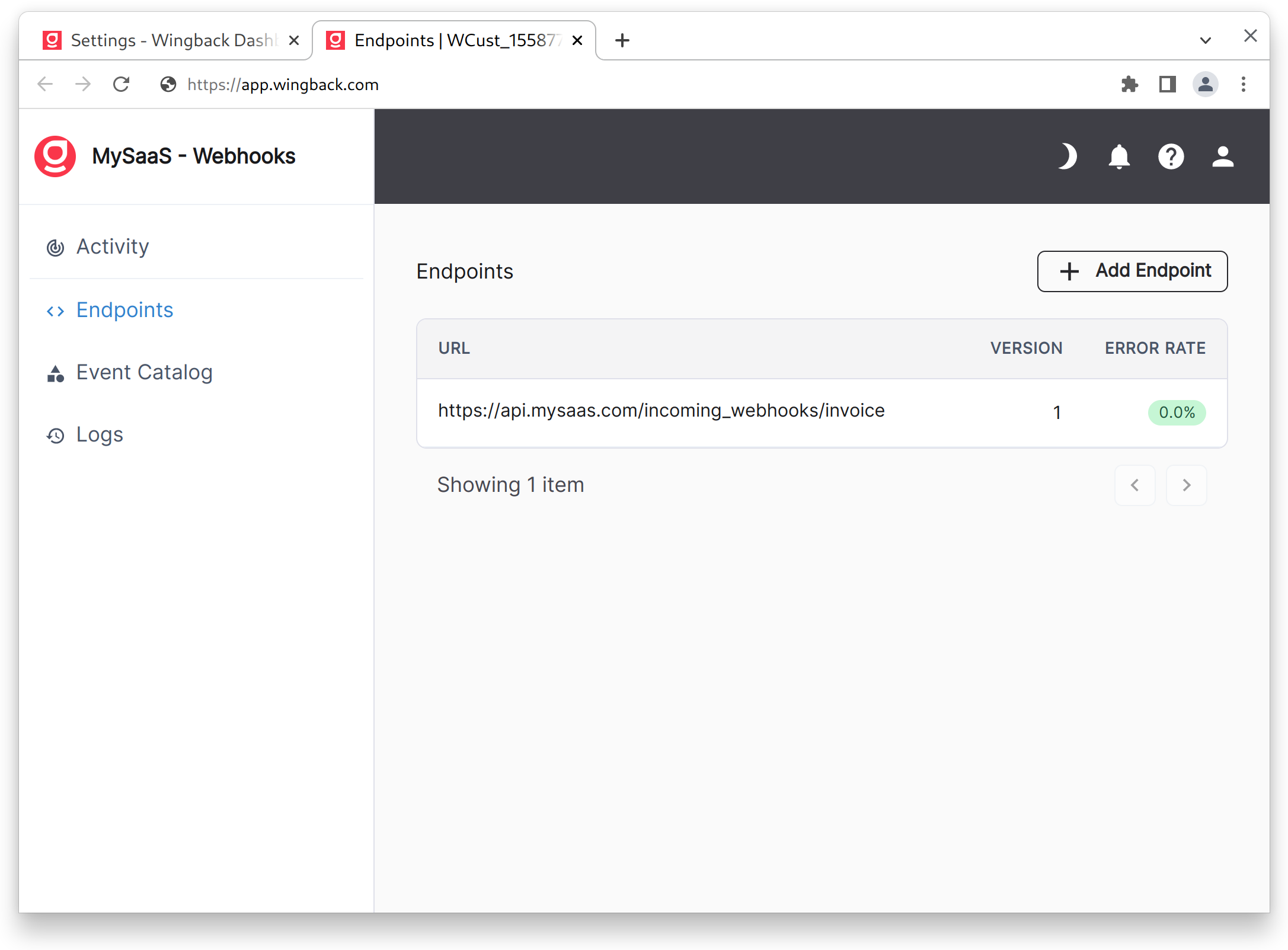 When creating a new endpoint, you'll have the option to select the specific events it should subscribe to.
Keep in mind that events can be triggered by a variety of actions, either from the customer using the self-serve billing portal, changes to customers and plans in the customer portal by your sales, accounting, and customer success teams, or plan changes triggered through the API.
## Event Catalog
We're constantly expanding the event catalog. If you need a specific event that's not listed, don't hesitate to reach out!
The following table provides a list of events currently supported:
### Customer
| Name | Description | Event | Payload |
| --------------------------------- | -------------------------------------------------------------------------------------------------------------------------------------------------- | ------------------------------------ | --------------------------------------------------------------------- |
| **Customer** | | | |
| Customer created | A new customer has been created in Wingback (useful if you are signup customers via Wingback signup links and then create an account on your side) | `v1.customer.created` | [Customer ID](/dev/api-reference/customer/get_c_customer_customerid) |
| Customer updated | The customer's information on file has been updated (e.g. billing address). | `v1.customer.updated` | [Customer ID](/dev/api-reference/customer/get_c_customer_customerid) |
| **Invoice** | | | |
| Invoice Created | A new invoice has been created. | `v1.invoice.created` | [Invoice ID](/dev/api-reference/invoice/get_c_invoice_invoiceid) |
| **Plan Changes** | | | |
| Plan assigned (future start date) | A customer is scheduled to start a (new) plan at a future date. | `v1.contract.signature.scheduled` | [Contract ID](/dev/api-reference/contract/get_c_contract_contractid) |
| Plan assigned (starts now) | A customer has started or switched plans. | `v1.contract.signature.completed` | [Contract ID](/dev/api-reference/contract/get_c_contract_contractid) |
| Plan cancellation scheduled | A customer has canceled a plan renewal, or a plan cancellation has been scheduled. | `v1.contract.cancellation.scheduled` | [Contract ID](/dev/api-reference/contract/get_c_contract_contractid) |
| Plan terminated/ended | The customer is no longer assigned to the plan. | `v1.contract.cancellation.completed` | [Contract ID](/dev/api-reference/contract/get_c_contract_contractid) |
| **Payments** | | | |
| Transaction started | An attempt is being made to charge an automatic payment method. | `v1.payment.started` | [Customer\_ID](/dev/api-reference/customer/get_c_customer_customerid) |
| Transaction error | The payment method could not be charged (triggers on every failure when set to retry). | `v1.payment.failed` | [Customer ID](/dev/api-reference/customer/get_c_customer_customerid) |
| Transaction successful | A customer was successfully charged via the payment method. | `v1.payment.succeeded` | [Customer ID](/dev/api-reference/customer/get_c_customer_customerid) |
When creating a new endpoint, you'll have the option to select the specific events it should subscribe to.
Keep in mind that events can be triggered by a variety of actions, either from the customer using the self-serve billing portal, changes to customers and plans in the customer portal by your sales, accounting, and customer success teams, or plan changes triggered through the API.
## Event Catalog
We're constantly expanding the event catalog. If you need a specific event that's not listed, don't hesitate to reach out!
The following table provides a list of events currently supported:
### Customer
| Name | Description | Event | Payload |
| --------------------------------- | -------------------------------------------------------------------------------------------------------------------------------------------------- | ------------------------------------ | --------------------------------------------------------------------- |
| **Customer** | | | |
| Customer created | A new customer has been created in Wingback (useful if you are signup customers via Wingback signup links and then create an account on your side) | `v1.customer.created` | [Customer ID](/dev/api-reference/customer/get_c_customer_customerid) |
| Customer updated | The customer's information on file has been updated (e.g. billing address). | `v1.customer.updated` | [Customer ID](/dev/api-reference/customer/get_c_customer_customerid) |
| **Invoice** | | | |
| Invoice Created | A new invoice has been created. | `v1.invoice.created` | [Invoice ID](/dev/api-reference/invoice/get_c_invoice_invoiceid) |
| **Plan Changes** | | | |
| Plan assigned (future start date) | A customer is scheduled to start a (new) plan at a future date. | `v1.contract.signature.scheduled` | [Contract ID](/dev/api-reference/contract/get_c_contract_contractid) |
| Plan assigned (starts now) | A customer has started or switched plans. | `v1.contract.signature.completed` | [Contract ID](/dev/api-reference/contract/get_c_contract_contractid) |
| Plan cancellation scheduled | A customer has canceled a plan renewal, or a plan cancellation has been scheduled. | `v1.contract.cancellation.scheduled` | [Contract ID](/dev/api-reference/contract/get_c_contract_contractid) |
| Plan terminated/ended | The customer is no longer assigned to the plan. | `v1.contract.cancellation.completed` | [Contract ID](/dev/api-reference/contract/get_c_contract_contractid) |
| **Payments** | | | |
| Transaction started | An attempt is being made to charge an automatic payment method. | `v1.payment.started` | [Customer\_ID](/dev/api-reference/customer/get_c_customer_customerid) |
| Transaction error | The payment method could not be charged (triggers on every failure when set to retry). | `v1.payment.failed` | [Customer ID](/dev/api-reference/customer/get_c_customer_customerid) |
| Transaction successful | A customer was successfully charged via the payment method. | `v1.payment.succeeded` | [Customer ID](/dev/api-reference/customer/get_c_customer_customerid) |